Chaque jour, nous vous offrons des logiciels sous licence GRATUITS que vous devriez autrement payer!
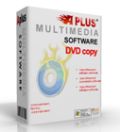
Giveaway of the day — APLUS DVD Copy
L'offre gratuite du jour pour APLUS DVD Copy était valable le 12 mars 2013!

DVD Copy/ DVD Clone/ DVD Burn/ DVD Backup est un outil de copie et de gravure destinés à vos films DVD préférés aux formats DVD-R(W) et DVD+R(W) sans perte de qualité. Il peut générer des copies en qualité 1:1 de vos films DVD. Le DVD copié est le même que le film que vous avez acheté. N'hésitez pas à le lire sur des lecteurs familiaux ou portables (dans une voiture par exemple). DVD Copy exploite la technologie la plus récente afin de prendre en charge la copie de n'importe quel DVD et pour offrir une compatibilité avec mes films DVD aux formats NTSC et PAL.
Quoi de neuf dans la dernière version :
- Vitesse la plus élevée du monde :copie de dvd 1:1/dvd en moins de 30 minutes sans perte de qualité.
- Prend en charge la compression et la copie de film double couche D9 ou D5 en D5 sans perte de qualité.
- Compatibilité avec les films DVd aux formats NTSC et PAL.
- Prend en charge les enregistreurs/graveurs SCSI, IDE, USB DVD du marché.
- Prend en charge la copie de films double couche (D9) en D5 tout en préservant les bonus, les menus, les sous-titres et les langues.
- Prend en charge la copie de films double couche (D9) en D5 tout en supprimant les contenus indésirables.
Configuration minimale:
Windows 7, Vista, XP, NT, 2000, 2003, 98, 95
Éditeur:
Aplus Software Inc.Page web:
http://dvd-copy-dvd-clone-dvd-burn-dvd-backup.tomp4.com/Taille du fichier:
10.2 MB
Prix:
$39.95
Titres en vedette
Aplus DVD Creator - Convertissez et gravez vos films directement sur DVD sans perte de qualité.
Aplus DVD to Divx Xvid Ripper - convertissez vos fichiers DVD en AVI XviD DivX, VCD/MPEG1, SVCD/MPEG2 de même qualité.
Aplus DVD to iPod Ripper - Profitez de vos films DVD sur iPod, iPhone et Apple TV dès maintenant!
GIVEAWAY download basket




offres du jour pour iPhone »





offres du jour pour Android »





Commentaires sur APLUS DVD Copy
Please add a comment explaining the reason behind your vote.
Well, if you are not a Bluray movie addicted geek and want just to copy a DVD directly to another DVD, without copying it into a Folder of your HD, to ISO and other video formats, this is the right tool for you! Usually the main purpose to do that is to create a backup copy of a whatsoever DVD/CD disk, should it be lost or compromised by scratches, although the freeware "Abyssal Recovery" can easily overcome this problem making possible to copy even DVD's that do not play due to scratches:
http://www.softpedia.com/get/System/Back-Up-and-Recovery/Abyssal-Recovery.shtml
If you are instead eager, like me, to copy a DVD/Bluray movie to folder, ISO and other video formats, in order to burn it to another DVD or better yet to watch the ripped DVD directly in your PC via virtual drives, mobile phones etc..., then forget this GAOTD and switch to better FREEWARE ALTERNATIVES without paying a dime for that!!
So, for what it does, I give this GAOTD a THUMBS DOWN because charging 40 bucks for a product like this with so few output options (only DVD ==> DVD) is sheer madness in my view!!
BEST (and BETTER) FREE ALTERNATIVES
* DVD disc -> DVD folder rip
http://www.dvdfab.com/hd-decrypter.htm
http://www.bluraytoavi.com/blu-ray-decrypter.html
http://www.softpedia.com/get/CD-DVD-Tools/CD-DVD-Rip-Other-Tools/Blu-ray-Disc-Ripper.shtml
http://www.softpedia.com/get/CD-DVD-Tools/CD-DVD-Rip-Other-Tools/WonderFox-DVD-Ripper.shtml
http://www.gilisoft.com/product-dvd-ripper-free.htm
http://www.bluraytoavi.com/dvd-decrypter.html
* DVD Disk ==> DVD folder, ISO ==> DVD disc
http://www.imgburn.com
http://www.starburnsoftware.com/products/starburn/features
http://www.burnaware.com/burnaware_free.html
http://forums.redflagdeals.com/archive/index.php/t-1270323.html
Want to clone for FREE an entire blu-ray movies collection to a perfect 1:1 backup copy, by making and mounting ISO images on a new disc? No problem:
http://www.softpedia.com/get/CD-DVD-Tools/CD-DVD-Rip-Other-Tools/Aurora-Blu-ray-Copy.shtml
* DVD Disk ==> Any other format
http://www.videotovideo.org
http://www.softpedia.com/get/PORTABLE-SOFTWARE/Multimedia/Video/Portable-XMedia-Recode.shtml
http://www.cuda-soft.com/video-converter/index.htm
Finally, to add chapters, menus, pics etc...to your DVD copy, you can do that for FREE using ahese ward-winning FREE APPS like these:
http://www.winxdvd.com/dvd-author
http://www.dvdflick.net/index.php
And how about a FREE TOOL capable of merging any video files of yours with external subtitles, in order to create professional multimedia files for iPhone/iPod playback?? Too good to be true, right? Wrong!!
http://www.softpedia.com/get/Multimedia/Video/Encoders-Converter-DIVX-Related/ALLConverter-To-iPhone.shtml
Enjoy!!
My 2 cents for today's giveaway!!
Save | Cancel
Pros
*Does DVD disc to DVD disc copies; will copy original DVD and burn onto target DVD
*Bypasses DRM protection: “CSS, RC, RCE, and UOPs”
*Supports DVD-9 and DVD-5 discs
*Can do DVD-9 -> DVD-9, DVD-5 -> DVD-5, and DVD-9 -> DVD-5 copy
Cons
*Is buggy
*Only does DVD disc to DVD disc copy, does not do DVD disc -> DVD folder or DVD disc -> ISO
Free Alternatives
DVDFab HD Decreypter (DVD disc -> DVD folder rip)
Best free CD/DVD/Blu-ray burning program for Windows (burn DVD folder -> disc)
Final Verdict
Click here for final verdict and full review
Save | Cancel
The version 8.87 from April 2011 has the extra option to copy to hard disk. If you install today's version 1.03 you can still go back and find the old file in the old directory and use that feature from version 8.87. However, when you run the old file it will still change the version number to 1.03 but don't let that worry you.
Save | Cancel
#2 - You can use any name to register the product, so I used my own.. I managed to copy and paste the key into the registration box.. If yours doesn't work maybe copy the key from the readme file then use keyboard shortcut CTRL+V (Hold down the Ctrl key and press the V key) to try pasting the key into the box.. You shouldn't have to type it all in.
Save | Cancel
@11_LancasterPA: Of course you can copy with only 1 drive: 1. insert the DVD you want to copy and click the start button - the app will store the data in a working folder on C: (what is not the best place, but anyway...). 2. You'll be asked to insert an empty disk, so you remove the disk you have inserted first and replace it with an empty disk and your work is done.
I tested this prog with 4 DVDs, and yes Ashraf, it is buggy indeed: 2 of the DVDs it did not accept, complaining they are not proper sources, but I am shure they are. The others were read correctly and written to the working folder. One of them I burned to an empty disk, the result was o.k., but during the whole testing procedure the prog was hanging 4 times!, it took a lot of patience not to shut it down.
If you want the copy result permanently in a folder, you may untick the option "Clear working folder...", and if want to avoid burning to a disk, you can cancel the job - probably it will hang for a while.
In general I have to say, that I never ever would pay money for this app, there are at least a dozen of better paid and free ones.
Save | Cancel