Chaque jour, nous vous offrons des logiciels sous licence GRATUITS que vous devriez autrement payer!

Giveaway of the day — Smart Diary Suite 4.6.1 Medical Edition
L'offre gratuite du jour pour Smart Diary Suite 4.6.1 Medical Edition était valable le 6 février 2011!

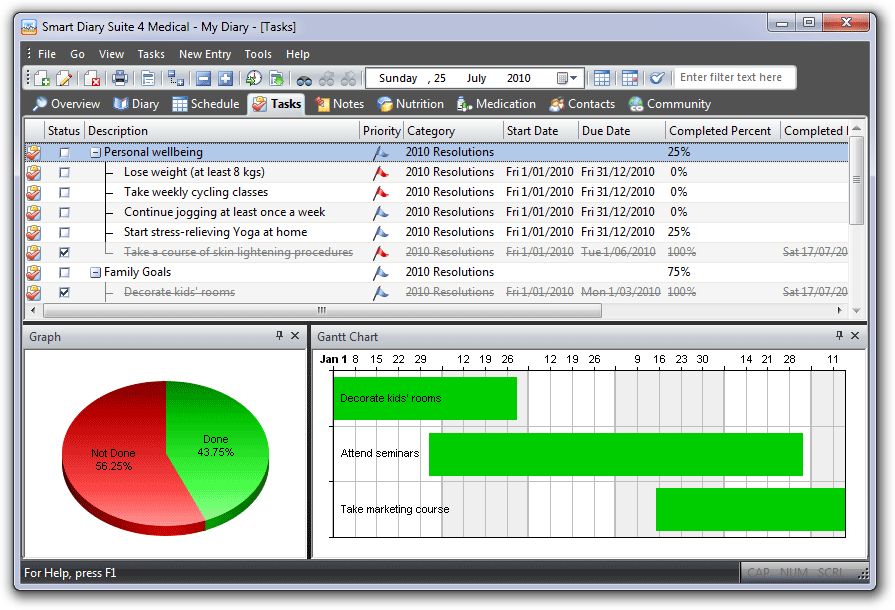
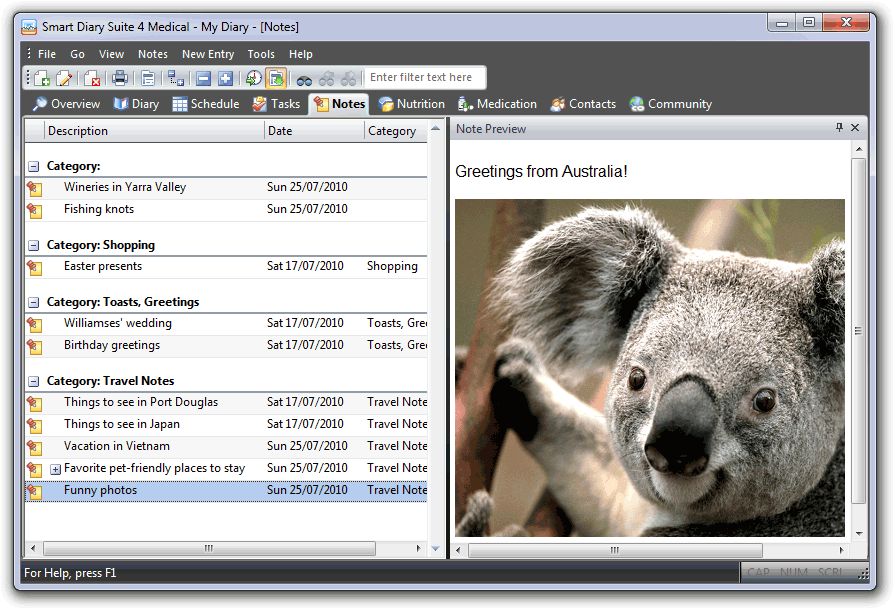
Smart Diary Suite vous permet d'organiser et de contrôler votre vie en un ensemble flexible et facile à utiliser. Voyez les effets visuellement en utilisant Life Factors! Plus qu'un journal ou qu'un PIM, Smart Diary Suit est une solution d'informations personnelles personnalisable et facile à utiliser. Aussi simple ou complexe que vous le désirez.
Fonctionnalités
- Archives quotidiennes - Enregistrez et parcourez vos archives chiffrées par mot de passe;
- Voyez votre vie - Gardez un registre de vos facteurs de vie et voyez les résultats sur un graphique en couleurs;
- Exprimez-vous - Enregistrez et rejouez votre voix dans le journal;
- Restez organisé - Un horaire vous est mis à disposition pour que vous ne manquiez rien d'important;
- Restez en focus - Utilisez les tâches pour vous rappeler de choses que vous voulez faire et suivre au fil du temps;
- et bien plus...
Configuration minimale:
Windows 2000/ XP/ Vista/ 7
Éditeur:
Programming SunrisePage web:
http://www.sdiary.com/index.phpTaille du fichier:
12 MB
Prix:
$69.95
Commentaires sur Smart Diary Suite 4.6.1 Medical Edition
Please add a comment explaining the reason behind your vote.
Portable? Yes! This particular offering (the one you can download at giveaway) is NOT a portable edition. However, if you want portable you can go on the Programming Sunrise website as given at the top of the Giveaway page, download the portable medical edition as I did and the giveaway code WILL work. Very generous, thank you Programming Sunrise and Giveawayoftheday.
Overall this program is very nice as a free portable and as a free portable that doesn't clog the registry it seems very worth while to give it a go for awhile. It has lots of options. On the downside you can get lost in the options. The options aren't as adjustable as maybe I would like.
For example: There is a calendar on the suite. What I do with my portable thunderbird (with lightening installed) is I minimize to the calendar, use the Aquasnap portable shake to make it on top and transparent. Hence, I have a little calendar that is transparant and always on top that I can double-click to maximize. I tried that with Smart Diary Suite and it worked fine except the toolbar is like 3 lines and I couldn't figure out an easy way to make the toolbar smaller.
Another example is the emoticons. There is like the diary, schedule, task, notes. In the subset of diary there are life factors--body, mind, matter. In the mind subset there is mood, dream, motivation, agreeableness, agitation. In the mood category you find your emoticons. These are--excellent, very good, good, nuetral, not good, sad, depressed. I find I want more emoticons so I right click on the emoticons--and right clicking at least doesn't give me more options.
Likewise, when I go to matter--I want the program to AUTOMATICALLY put in my local weather, but there doesn't seem to be a way to automate that (matter has temperature, humidity, weather). Plus I'd like it to track my sleep patterns/mood verses time of day . . . but I haven't figured out if it will do that yet.
If you like to track stuff this program might be very nice indeed as it will track stuff and even show simple graphs. I'm going to keep the portable version and give it a fair go, try to find out if there's non-intuitive ways to tweak it (though I can already tell Firefox browser this is not). Still it seems worth keeping to try out over a period of time. I've tried some other alternatives that didn't seem as good/had other weaknesses.
Other free diary alternatives: Rednotebook portable, AM Notebook.
Other free calendar alternative: Thunderbird (or Thunderbird portable) (with lightening calendar installed).

While it's true that I don't use this type of software, I like Smart Diary Suite and I can see a number of uses for the information it tracks. While you could use separate applications, the integration is nice. It's not the greatest PIM, but it has useful features like notes, attachments, decent recurrence options, voice notes, some import/export abilities, etc. The installation mostly registered a bunch of stuff related to the sound recorder (doesn't damage your codecs), but none of it is available, just record/stop, you'll have to set the device and levels with Windows recording devices. Most of the other registry entries it adds are for window and panel positions. I ran into coding and stability issues when it thought that windows which I had closed were still open.
Some things which I mentioned last time haven't been fixed, like errors in the units converter and lack of a complete ingredient database (apparently, you have to install sample entries to get anything at all). You can add anything manually, but you have to look up everything yourself. Integration with Wolfram Alpha for conversions and ingredients would be nice, and as someone mentioned, it could also download the weather data. There are three ways to integrate with Wolfram Alpha--loosely by launching an external browser (can be your default), internally opening a browser window (that will be IE, tough), or using the Wolfram Alpha API (commercial use requires paid licensing, plus the data may come back graphically requiring manual copying, I haven't looked at the API options).
Really good one, installed perfectly in Win7 64 bit
Good features like Voice Recording , Graph
Bullets are not working in the Diary Entry and no in built templates included
Thanks to GOTD and to the Programmer
If you have enough time available to keep a comprehensive diary like this one, you probably do not have much to record in it :)
Installed on XPSP3 without any problems; download size was 12 meg; installed to under 20 meg. Activated without any problem (must use name as Giveawayoftheday to register). Set up a simple calender without any problems. Help file is very easy to understand and apply.
Haven't attempted anything else, but if it goes as easy; I will keep it. Thanks GAOD.
offres du jour pour iPhone »





offres du jour pour Android »





Avec la langue de Voltaire aussi :
je prends
tu prends
il prend
nous prenons
vous prenez
ils prennent
;))))
Save | Cancel
Logiciel intéressant mais étant fâché avec la langue de shaquespeare, je ne prens pas !
Save | Cancel