Chaque jour, nous vous offrons des logiciels sous licence GRATUITS que vous devriez autrement payer!
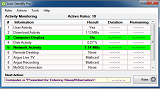
Giveaway of the day — Auto Standby Pro 2.16
L'offre gratuite du jour pour Auto Standby Pro 2.16 était valable le 28 mai 2016!

AutoStandByPro est un utilitaire léger, intuitif, et simple qui vous aidera à diminuer vos factures d'électricité en mettant votre ordinateur à un niveau de consommation très bas lorsqu'il n'est pas nécessaire. AutoStandByPro est une extension du système de gestion de l'alimentation qui est déjà présent sur un ordinateur Windows, mais avec des caractéristiques meilleures et plus complètes. Correctement utilisé, AutoStandByPro vous aidera à gérer efficacement les besoins en alimentation de votre ordinateur.
Avec AutoStandByPro, vous pouvez Étendre, Redémarrer, Mettre en Vielle, Mettre l'ordinateur en mode économie d’énergie, fermer la session d'utilisateur, Empêcher le Mode Veille / Hibernation, Empêcher l'Affichage de Vielle ou l'exécution d'une action personnalisée en utilisant une combinaison de conditions différentes telles que la date/heure, affichage de l'ordinateur, Utilisateur/Système de Traitement, Service Windows, activité Utilisateur/Clavier/Souris , activité CPU/disque/Réseau/Téléchargement, Appareils Rechargeable accessible sur le réseau, Demandes de Puissance et demandes Http Get /Post. De plus AutoStandByPro peut mettre un ordinateur qui est en vielle en marche en fonction des différents horaires date/heure définis par l'utilisateur (Explication des fonctionnalités).
Configuration minimale:
Windows Vista /7 /8 /8.1 (x32/x64); .NET framework version 4.0 or later
Éditeur:
autostandbypro.comPage web:
https://autostandbypro.com/index.html#gsc.tab=0Taille du fichier:
3.5 MB
Prix:
$27.99
GIVEAWAY download basket




Commentaires sur Auto Standby Pro 2.16
Please add a comment explaining the reason behind your vote.
Now this I could use on my WIn 10 that won't sleep automatically, but I see it is old code and not Windows 10 compatible - shame, may have solved a nine month old problem.

I was willing to give this a go, thinking maybe it might help with a little overheating problem. After installation it took a while to find the shortcut and when i did, and clicked it, it threw up a window saying it couldn't find 'sch exe'. Who's got the time and patience to find out what was wrong? Uninstalled. With prejudice.
For those seeking something more than Windows standard 'Power Options' offers, this might be of interest. Getting $30sworth more -- the reinstall price of this software -- not so much. The developer needs to re-think its pricing.
I'd view this software as a complete waste of money. The power usage on a modern personal computer if left on 24 hours a day is approximately $.87 a month based on our rates in Tampa and my Dell Laptop and PC. Using the windows included software and tailoring it to my usage of having the PC's running full probably 3 hours a day and in a hibernate or standby setting for the rest reduces that to approximately $.06 a month. At $30 for the software my payback would be 41.66 years. Obviously no cost for the free year but where is the need to add another piece of software to an existing piece for $.72 cents savings during even the "free" year? Not for me.
I hate to point out something that is utterly obvious, but when I don't need my computer I just turn it off.
That seems to solve any issues of excessive power consumption.

offres du jour pour iPhone »





offres du jour pour Android »




Can some responsible tell me why it's a Free Personal Home version, while you annouced a Pro one (the program mentions: "You are running an Free Personal/Home Version!") ?
Save | Cancel