Chaque jour, nous vous offrons des logiciels sous licence GRATUITS que vous devriez autrement payer!
Giveaway of the day — Hard Disk Sentinel Standard 5.01
L'offre gratuite du jour pour Hard Disk Sentinel Standard 5.01 était valable le 22 juin 2018!

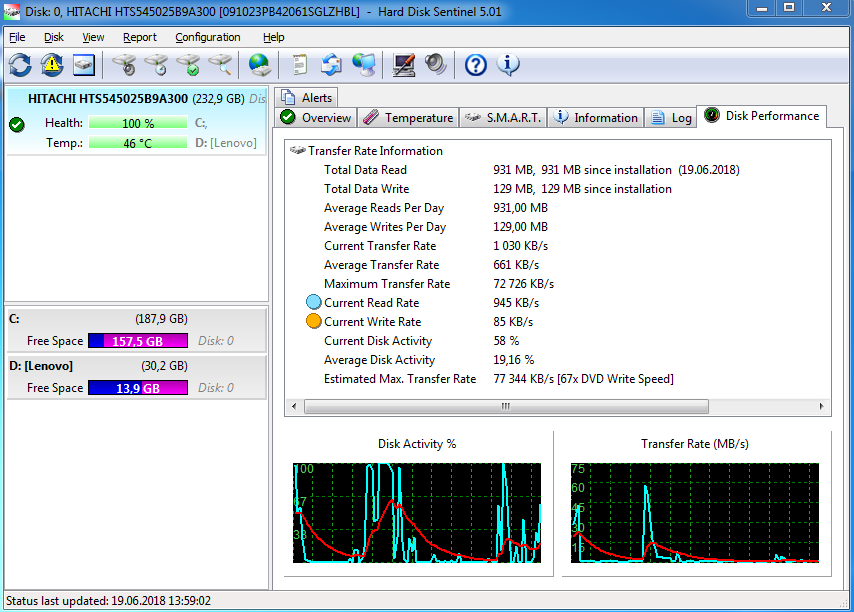
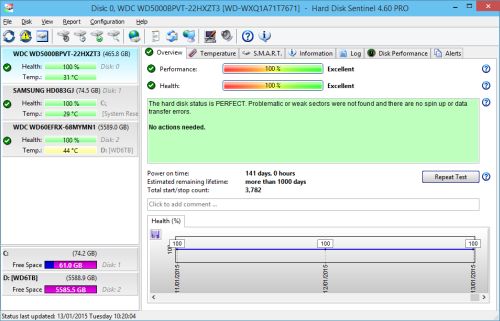
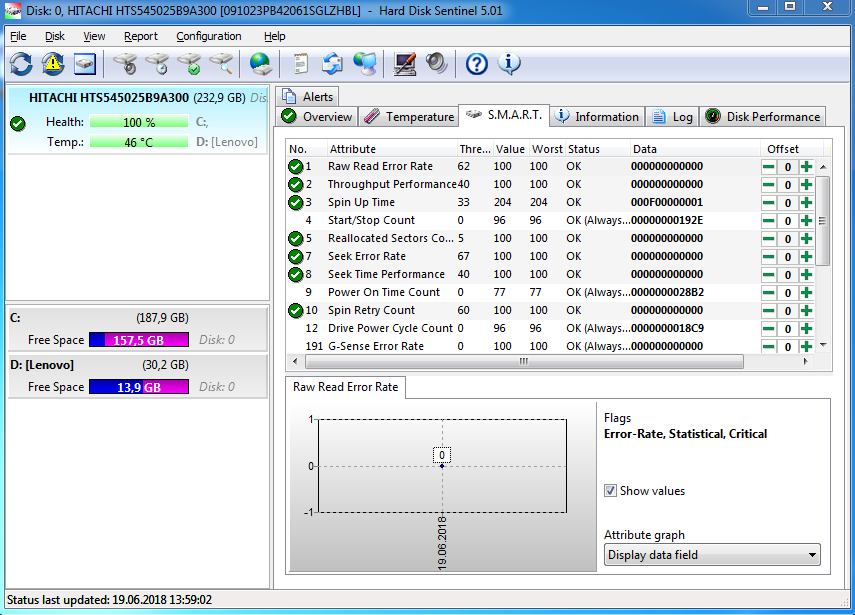
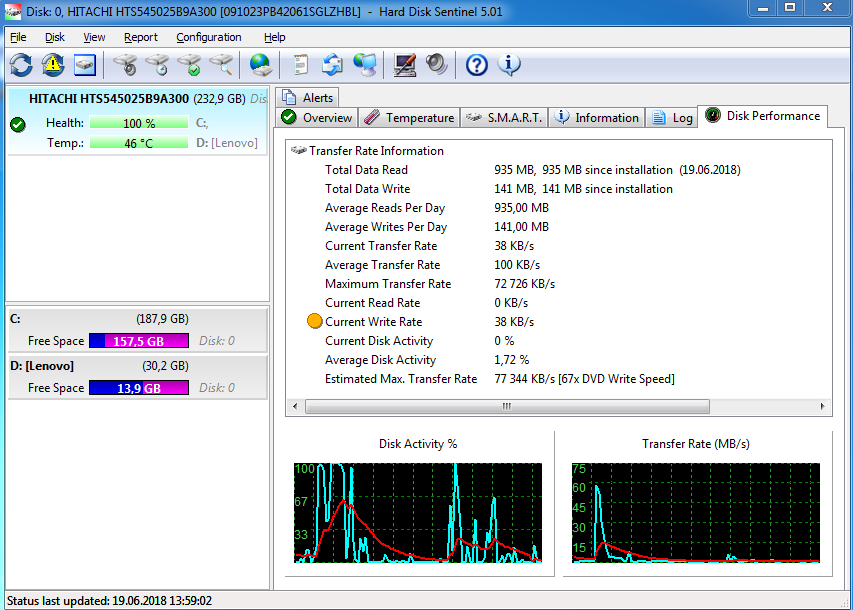
Détecte les problèmes de Disque Dur avant que les choses ne s'empirent. Avec Hard Disk Sentinel, vous aurez toujours un regard sur la sante de votre disque dur avant qu'un désastre irréparable n'arrive à vos données. Hard Disk Sentinel est la clé pour tester, diagnostiquer, et remédier aux problèmes de disque dur, même avec les Disque à Circuit Intégré.
Avec Hard Disk Sentinel, vous voyez instantanément le rapport détaillé de l’état complet de votre disque, y compris la température, données d'autosurveillance, vitesse des transferts, et encore plus. Tout changement en ces caractéristiques peut être un signe d'une défaillance imminente! Hard Disk Sentinel fonctionne aussi sur les disques dur utilisés comme USB externe ou boitier e-SATA et contrôleurs RAID. Pas besoin d'utiliser différents outils pour vérifier le disque dur interne, externe, SSDs, disques en ensembles RAID, tous cela vous êtes donné en un seul logiciel. Si vous tenez à vos données, achetez vous une copie de Hard Disk Sentinel aujourd'hui!
Configuration minimale:
Windows 95/ 98/ 98 SE/ ME/ NT4/ 2000/ XP/ 2003/ 2008/ Vista/ 7/ Home Server/ 2012/ 8/ 8.1/ 10; Pentium or compatible CPU; 64 MB of system memory; HD: 30 MB
Éditeur:
Hard Disk MonitoringPage web:
http://www.hdsentinel.com/hard_disk_sentinel.phpTaille du fichier:
26.4 MB
Prix:
$19.50
Titres en vedette
Commandez Hard Disk Sentinel PRO avec 45% de rabais pour 1 ordinateur, OU pour 5 ordinateurs, Licence familiale.
offres du jour pour iPhone »





offres du jour pour Android »



Commentaires sur Hard Disk Sentinel Standard 5.01
Please add a comment explaining the reason behind your vote.
I've used many different programs that report on the health of hard disks and SSDs and in my opinion, Hard Disk Sentinel is much better than the alternatives. What makes it stand out, is that rather than just indicating if there is a problem with a drive, it actually gives a fairly detailed explanation of the condition of the drive as well as an estimated life span. This is very useful, as it can tell you if any problems with a drive are minor and not worth worrying about, until the health decreases further, or if there are serious issues, which mean you really need to replace the failing drive, as soon as possible.
I like Hard Disk Sentinel so much, that I actually purchased a license. Whenever I'm working on a customer's computer, I install a trial version, so I can see if there are issues with the hard drive. If the drive is failing, I clone the drive to a new one (you can't do this with Hard Disk Sentinel itself), so that the customer does not lose any of their precious data.
If you miss out on today's giveaway, CrytalDiskInfo is free alternative. However, it does not give a description of the condition of the drive.
Save | Cancel
A very old version 5.01 being given away considering they are up to version 5.20.
Save | Cancel
Nigel: but this is not "a very old version".
Hungarian developer HDS's approach to build numbers has always been idiosyncratic, something those juvenile uptickers of your criticism would've realised if they'd bothered to check first before parading their ignorance. Current version 5.20 (2018) was preceded by 5.01 (2017), 4.71 (2016), 4.60 (2015) 4.50 (2014) and 4.40 (2013).
I'm all for calling out developers who deserve it, but the kind of comment you've posted is unfair as well as misleading.
As to today's giveaway of 5.01, it may well be the previous version but that doesn't mean it's not worth downloading and trying out by those who don't already have HDD monitoring on their computers. It's not as though this is an unproven debut product; I first used Hard Disk Sentinel ten or so years ago and it's been tried, tested and appreciated by many thousands worldwide since then.
That's not to say every computer user will see the need for a commercial product when plenty of HDD monitoring freeware is already out there, including "CrystalDiskInfo" from a well-regarded Japanese Open Source developer.
Save | Cancel
I've used Hard Disk Sentinel for several years now. I't a nice piece of software. And I've never had a problem with it. You can have it start with windows to keep a constant check on your drive. Or you can just run it manually every once in a while to check that the temps and read/writes/errors are okay. Two thumbs up from me.
Save | Cancel
"1) disable the anti-virus suite and restart the computer. You need to disable all the anti-virus systems if you have more than one installed. Make sure it won't start automatically with the computer."
OUCH! Maybe I am in a majority of one here but instructions like this get me seriously concerned.
Save | Cancel
JingleBob, it's nothing to do with Hard Disk Sentinel. It's the software that Giveaway of the Day use to protect their giveaways, so that you can't install them, after the giveaway ends.
Save | Cancel
A small problem here, once again. Why do so many programmes only work when they have in icon in the system tray? I have them in a folder icon on the desktop, if needed can add them to the free launch bar, but my system ray is getting cluttered up, as well as reducing space for the things telling me what is working. In the Free launch (or if you want spyware the quick launch) if you insist, but please NOT in the system tray. If I remove it from there (as I once did) or from the start-up, it (whatever it is) will not work and has to be reinstalled, not possible with a GAOTD that has expired.
Save | Cancel
Laxative, which version of Windows are you running? If Windows 10 (and if I understand your point correctly) it allows full control over which application icons are displayed (or not) in the system tray. Right click over an unused bit of the system tray and select the last entry in the menu (with the cog wheel - 'Taskbar settings). The Taskbar window appears. Scroll down to the 'Notification area' sub-heading and click on 'Select which icons appear on the taskbar'. The window now lists all the application icons, each with an On-Off slide switch. Make your choices and close the window. Your choice of icons to be displayed should now run along the task bar - with the remainder hidden within the '^' icon ('Show hidden icons') at the left end of the line of icons. HTH.
Save | Cancel