Chaque jour, nous vous offrons des logiciels sous licence GRATUITS que vous devriez autrement payer!
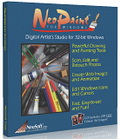
Giveaway of the day — NeoPaint
L'offre gratuite du jour pour NeoPaint était valable le 9 mai 2011!

NeoPaint est un studio d'artiste pour Windows facile à apprendre, puissant et amusant! Assez simple pour les débutants, mais rempli de fonctionnalités puissantes et d'outils avancés. NeoPaint rend facile la retouche de photos et la création d'images attrayantes pour les publications, présentations et internet!
NeoPaint prend en charge GIF animés, JPEG, PNG, BMP, ICO, PCX, TIF et plus. Il inclut plusieurs outils de retouche photo, des brosses personnalisés, formes 3D, filtres adoucir, aiguiser, yeux rouges, effets spéciaux, masques, textures, séparations de couleur, étampes, annuler multi-niveau, règles, grilles, dégradés, fureteur d'image, capture d'écran et plus.
Configuration minimale:
Windows 95/ 98/ Me/ NT4/ 2000/ XP/ Vista/ 7
Éditeur:
NeoSoft Corp.Page web:
http://www.neosoftware.com/npwfeatures.htmlTaille du fichier:
6.39 MB
Prix:
45$
Titres en vedette

Créez et publiez vos propres logiciels Windows avec NeoBook! Utilitaires personnalisés, matériel pédagogique, menus CD, applications de base de données, livrels et plus. C'est maintenant facile de créer et publier vos propres logiciels Windows. Avec NeoBook Rapid Application Builder, même les utilisateurs débutants peuvent rapidement combiner du texte, des images, du son, des vidéos, des animations Flash, du contenu HTML, des liens internet, des bases de données, des effets spéciaux et autres éléments pour créer des logiciels interactifs et professionnels.
GIVEAWAY download basket




Commentaires sur NeoPaint
Please add a comment explaining the reason behind your vote.

Having used and possessing a number of different graphics / painting programs from a few years ago running a small printing company specialising in image manipulation - and as an artist manipulating my own creations, I don't need yet another program to do the same thing but I downloaded and installed it on my 64 bit Windows 7 Home Premium easily.
It handles some very large files I have easily and has a good range of available tools. It won't replace my usual drawing program (but that cost more than this). A free alternative is GIMP shop but this has a very easy to understand user interface and only takes a few minutes to find your way around.

I purchased my first PC in 1989, an old XT computer with DOS 5, 640K of RAM and a 20MB hard drive. I used NeoPaint on that computer. It was awesome. When I later upgraded to Win 3.1, I continued using NeoPaint, and then again a few years later on Win95. I loved it. It was a trend setter, the best thing available for regular guys. I was somewhat of an evangelist for it back then!
Somehow over the years NeoPaint disappeared from my radar. I didn't even know they still existed. So you can imagine how excited I was to see this on today's GAOTD!
Unfortunately, they simply haven't kept up. Although the offer a few photo tools, they don't offer many. It feels more like a vintage "paint" program which, as far as I know, few people really use these days. Microsoft's Paint.net, GIMP, and Photofiltre are freebies, and their features far exceed NeoPaint. That would be OK if Neopaint perhaps adds a feature they don't have or if it does something much better than they do. After all, most of us have multiple image editing applications because one of them adds or does something better over the others. But I can't find anything.
The interface is decent. It might be considered a little dated and a bit difficult to navigate, but I don't really have much issue with it. It seems like most people could easily learn it. It's just a lack of features - good selection tools, filters, unique brushes, layers, etc. - that are missing. Sort of "the same as everyone else" but minus many things modern users have come to expect.
Nostalgia aside, then, I'm going to uninstall. But thank you GAOTD and NeoSoft. I do appreciate the offer, and for NeoSoft's purpose I hope the feedback you receive here will help you again become the innovative leader you once were.
Easy install and activation, a two step process today but no issues - it's nice to install something that doesn't want to be add dubious background processes and start-up entries.
I've only tested this briefly, doodling on a photo rather than serious editing, but so far I'm fairly impressed. The interface is quite intuitive and well made, with clear icons for the main selections, and text that pops up on mouseover. I'm very impressed with the help, which is well written and clear.
The "Mouse Cam" is a nice touch too, showing a very high magnification of the area immediately under the cursor for precise placement.
I don't have time to fully test it in serious photo editing, but it looks very good so far. Not a replacement for Photoshop, GIMP, or whatever, but I don't think that's where they're aiming. I found it much less daunting than many image editors but it does have many useful features like a clone stamp, dodge/burn, and so on.
Definitely a keeper unless there's some major flaw I haven't found yet.
Thanks for offering this today, thumbs up here! :o)
Anytime a program says that it supports Win95, I have concerns, so I tested this in a VM. Install wasn't bad, adds support for some of its file extensions, most of the other root registry entries were for the well-known LEADTOOLS imaging and screen-capture tools. This is similar to other paint-type tools like Paint.NET, et al. I'm not the person to ask about this type of tool. It was fun to play with, and has a number of the expected features and effects (including some interesting ones), but I don't see it competing with newer tools like Paint.NET, which has very sophisticated features (not to mention a modern UI). But if NeoPaint does something that you like, there's no harm in installing it.
I wasn't too sure about this. Some positive reviews, but nothing glowing. As an occasional website builder I'm always looking for graphics programs to add to my arsenal with a minimum or no cost. I'm no graphics expert so I need things that work without too much fuss. Downloaded and installed on WinXP Sp3 easily. Word of warning - after doing the registration, close the program and restart it, or the reg doesn't show.
OK, it is simplistic, but then they claim nothing more. It has some features, though not unique, which often require 2 or more programs to achieve. Import from scanner/camera is one I value highly - it is not always supported in other programs. The screenshot grabber is excellent, with a good selection of features and ways to collect screenshots. It's worth it's weight for that alone, since I normally use Gadwin Printscreen (freeware & excellent) and then import into another program.
Would be nice if the colour picker could lift colours directly out of another program (browser for instance), but I use Color Cop (another excellent freeware) for that, so not a huge issue.
There is a comment about modernising the interface. It could do with it, but I don't think it's that bad. I use a similar program for simple stuff called Image Forge (freeware), which has the worst interface in the world (probably built for Win95 and never updated), but it works. The interface is secondary to the functionality ALWAYS.
offres du jour pour iPhone »




offres du jour pour Android »





Thanks for sharing. What a palserue to read!
Save | Cancel
Neopaint : fichier corrompu
Save | Cancel
un petit soft qui parait sympa à la base: toutes les fonctions sont là..
sauf la gestion de la pression, ce qui le met hors jeu d'entrée. on vas dire: dommage, et attendre la prochaine mouture, en l’espérant plus aboutie
Save | Cancel