Français
Chaque jour, nous vous offrons des logiciels sous licence GRATUITS que vous devriez autrement payer!
$29.90
EXPIRÉ
Giveaway of the day — Photo Toolbox 1.12.3.1
Photo Toolbox est un logiciel d'édition photo professionnel pour Windows.
$29.90
EXPIRÉ
Note des utilisateurs:
293
0 commentaires
L'offre gratuite du jour pour Photo Toolbox 1.12.3.1 était valable le 23 janvier 2013!
Offre gratuite du jour

Control remote desktop or laptop from any device and anywhere!

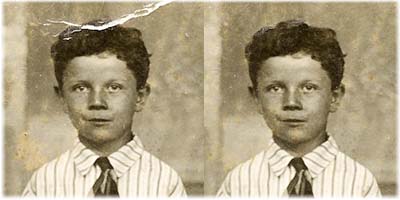
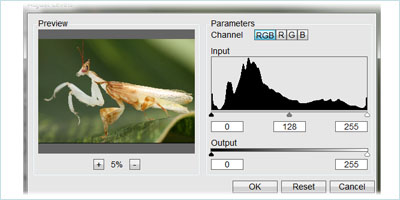
Photo Toolbox est un logiciel d'édition de photos professionnel qui vous permet d'importer, d'organiser, de retoucher ou de réparer vos photos numériques. Il combine de nombreuses fonctionnalités facile à utiliser et performantes qui peuvent perfectionner votre photo en quelques étapes simples.
Fonctionnalités clés :
- Importe vos images à partir de votre appareil photo et organise par date.
- Plusieurs outils d'ajustement de la couleur permettant d'améliorer la couleur de la photo et l'éclairage .
- Floute ou améliore la netteté de l'image sans augmentation des bruits numériques.
- Correction des photos grâce aux fonctions Clone Stamp (tampon clone), Blemish Remover (outil de suppression de rougeurs) et Red Eye Reduction (réduction des yeux rouges).
- Sélection d'outils flexibles pour une édition partielle.
- Utilisez Effect Brush (Pinceau à effets) pour retoucher un portrait ou ajouter facilement un effet spécial à une image.
- Prend en charge l'ouverture des fichiers RAW et 48bpp.
Configuration minimale:
Windows XP, Vista, 7 (x32/x64); 1GHz and higher, Multi-core CPU is recommended; 512MB and higher. 2GB RAM is recommended; 20MB HD space
Éditeur:
Photo-toolbox.comPage web:
http://www.photo-toolbox.com/Taille du fichier:
9.75 MB
Prix:
$29.90
GIVEAWAY download basket

Developed by CyberLink Corp.

Developed by PhotoInstrument

Create, manage, copy and edit custom images.

Developed by Mirillis Ltd.
offres du jour pour iPhone »

$19.95 ➞ logiciel gratuit du jour

$0.99 ➞ logiciel gratuit du jour

Every Day Spirit is a collection of beautiful, original, hand-crafted wallpapers created to make your phone look amazing.
$0.99 ➞ logiciel gratuit du jour

$4.99 ➞ logiciel gratuit du jour

$1.99 ➞ logiciel gratuit du jour
offres du jour pour Android »

$0.99 ➞ logiciel gratuit du jour

$0.99 ➞ logiciel gratuit du jour

Spelling Right is a new challenging educational spelling game that will test your English spelling skills.
$2.29 ➞ logiciel gratuit du jour

$0.99 ➞ logiciel gratuit du jour

$1.49 ➞ logiciel gratuit du jour
Commentaires sur Photo Toolbox 1.12.3.1
Please add a comment explaining the reason behind your vote.
Well....this tool does what it claims pretty well.
Can import pictures from a digital camera and perform some basic graphic editing operations over them, such as blemish removing, red eye reduction and effect brush. And it's NOOBS friendly as well, since it's very easy to use!!! So if you need a program like this just grab it and enjoy it for a while!!
That being said, why pay 30 bucks if you can do the same things and even more with FREE (and PORTABLE) tools like these?
* (Portable) Hornil StylePix (==> My Personal First Choice)
This is a freaking awesome professional image editing program with an impressive number of advanced features enabling you to draw pictures, edit photos and more. In short it can resize & rotate your photos, perform color correction & synthesis photos, type text on the photo, cut, copy & paste photos, sharpen/blur photos, remove red-eye & dust etc...) and more. It works great on Net-books and laptops or virtual machines (vmware, virtual box, virtual pc and etc.) since it comes with a very low RAM & CPU usage.
http://hornil.com/en/products/stylepix/Features.html
(Video) Tutorials:
http://hornil.com/bbs/board.php?bo_table=sp_tip
http://hornil.com/en/community/HornilStylePixVideoTutorials.html
* Portable RealWorld Paint 2011.1
Very handy and reliable FREE app which makes image editing a breeze. The editor supports Photoshop, GIMP, Paint.net files and animated GIFs. It's not only able to remove objects, red eyes and blemishes from your photos with its clone tool, but it can also make animations (flashing buttons, animated forum avatars, filmstrips etc…), create professional logos, buttons and/or web icons, as well as change shapes of your pics with the Shapeshifter tool (Liquify in Photoshop’s terms).
http://www.rw-designer.com/image-editor
* NPS Image Editor
Amazing FREE image editor tool with over 50 built-in filters; with this stunning program, users are able to customize the set of color swatches and even create their own personal filters to apply on the entire image. Photo manipulation tools include a clone stamp and a warp tool: cool, isn't it?
http://nps.nookkin.com/features.ndoc
* Funny PhotoMaker
Amazing FREE Image editor app, which helps you edit your photos with over 150 stunning photo frames, face fun & artistic 3D effects and then export them in image file and GIF animation.
http://www.funny-photo-maker.com
Full review:
http://www.addictivetips.com/windows-tips/funny-photo-maker-apply-effects-insert-images-into-amusing-scenes
* Phoxo
http://www.phoxo.com/en
* Toolwiz Pretty Photo
http://www.toolwiz.com/products/toolwiz-pretty-photo
* ImageJ (advanced users only)
http://rsb.info.nih.gov/ij/features.html
* Cosmetic Guide
http://tintguide.com/cosmetic.html
* Paint.NET
http://www.getpaint.net
Pretty much SATURATED field, isn't it dudes? LOL!
Enjoy!!
Save | Cancel
To active successfully, please don't launch Photo Toolbox before running Active.exe.
Save | Cancel
Or you could just download the excellent Zoner Studio, which is free and far more capable than this offering.
Save | Cancel
Pros
*Allows you to adjust hue, saturation, contrast, and brightness
*Comes with a blur and sharpen tool, and tools like Clone Stamp, Blemish Remover, and Red Eye Reduction
*Offers multiple selection tools, including Magic Wand, Rectangular, Elliptical, and Lasso selection
*Offers support for RAW format pictures
Cons
*Doesn’t offer many, if any, features that you can’t get out of a free photo editor
Free Alternatives
Review of Best Free Photo Editor for Windows
Scarab Darkroom (RAW image converter)
Final Verdict
Click here for final verdict and full review
Save | Cancel
'Tis the kind of photo application that I prefer -- simple GUI and very much manageable learning curve -- unlike PS which gets me bored trying to learn how to use it, just for the purpose of doing simple edits to my photos and not as what a professional photographer does.
After just a few minutes after install, I was able to finish different edits of each individual few photos.
Thanks LifeSniffer and GOTD!
note
Save | Cancel